Full Working NSG on a Locked Sony Xperia via Temp Root and QRTR Bridge
Enable full Qualcomm DIAG logging in Network Signal Guru on a locked Sony Xperia 1 V using temporary root and a lightweight QRTR bridge.

Network Signal Guru (NSG) is one of the few Android tools capable of decoding raw Qualcomm DIAG streams into readable RRC, NAS, and physical-layer logs. On Samsung devices it works out of the box thanks to their legacy /dev/diag character device. However on phones without that interface (such as my Sony Xperia 1 V), NSG will fallback to the limited Android telephony API. Also, accessing modem diagnostics interface inherently requires root privileges which comes with its own class of quirks.
This post documents how I got full NSG network logging running on my phone without unlocking the bootloader: a temporary root exploit grants uid 0 for the current boot, a lightweight superuser implementation that allow apps to have root access and a bridging daemon that converts QRTR IPC messages to the /dev/diag character device so NSG can work without modifying its modem access logic. A simple reboot wipes the slate clean: no patched boot images, no modified partitions, and Android Verified Boot stays green.
Scope & Operational Notes
- Context & Safety: Tested on personal hardware for passive cellular diagnostics. This is not a carrier unlock or theft-bypass guide.
- Attestation: While a session is active, SELinux is permissive and Play Integrity will trip. A reboot restores the untouched stock boot chain (
verifiedbootstate=green).- Attribution: Kernel exploitation relies on GhostLock and its community kernel offsets.
Why this is hard
Three obstacles stand in the way on modern Qualcomm hardware:
- DIAG moved away from character devices. On recent Snapdragon SoCs, the DIAG service communicates over QRTR (Qualcomm IPC Router) rather than exposing
/dev/diag. NSG’s engine expects a serial-like character device; it cannot speak QRTR sockets. - NSG expects Samsung’s port layout. Even when a diagnostic interface exists, NSG explicitly probes for Samsung-specific nodes like
/dev/umts_routerbefore enabling its full protocol decoder. - Root is required—but bootloader unlocking is too high a price. Interacting with the QRTR DIAG service demands
uid 0. The traditional route requires unlocking the bootloader and flashing a Magisk-patched boot image—permanently modifying the boot chain, voiding warranties, and tripping hardware-backed Play Integrity checks.
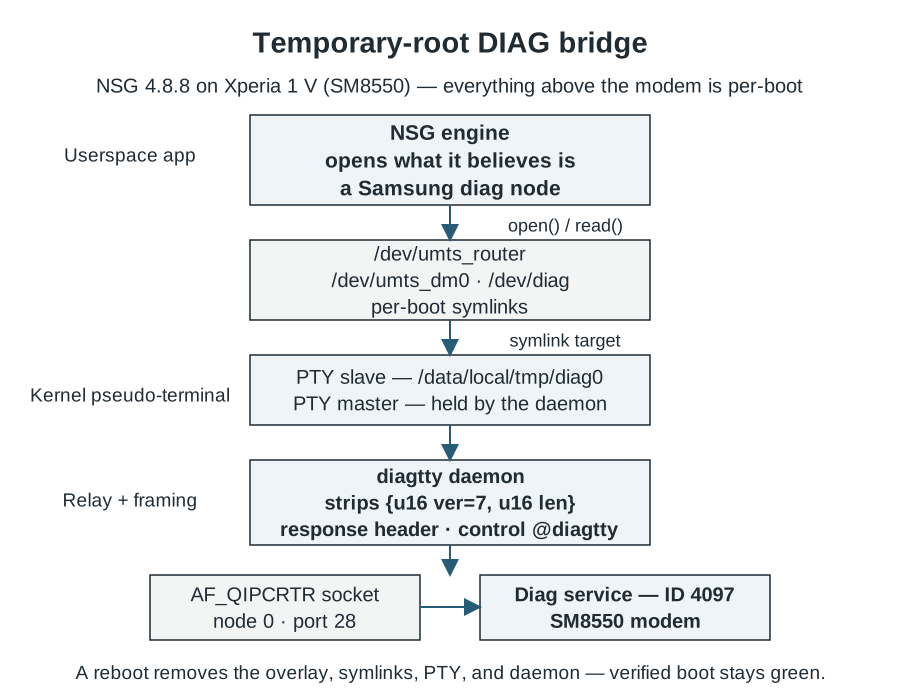
The bridge architecture: NSG opens what it believes is a Samsung diagnostic node; behind the symlink sits a PTY whose master end translates traffic to the modem’s QRTR DIAG service.
View full-size image (opens in a new tab)Temporary root neatly resolves the third obstacle. GhostLock leverages an n_tty kernel use-after-free vulnerability accessible from an unprivileged adb shell, requiring no flashing or bootloader unlock. I also need to creadit community work (NickJi2019) for providing the specific Linux kernel offsets for the Xperia 1 V’s 5.15 kernel. Root access lasts only until reboot and cannot persist across one — which, for keeping the device stock ROM and passing safety checks, is an asset rather than a limitation.
Prerequisites
| Item | Value |
|---|---|
| Phone | Sony Xperia 1 V (XQ-DQ72), Android 15, build 67.2.A.3.178 |
| Kernel (must match exactly) | 5.15.189-android13-8-00016-g51bba4309aac-ab14546557 |
| NSG | 4.8.8 (com.qtrun.QuickTest) |
| Host | macOS or Linux with adb and the Android NDK’s aarch64 clang |
| Scripts and sources | glsu-kit |
Check the most critical precondition first:
$ adb shell uname -r
5.15.189-android13-8-00016-g51bba4309aac-ab14546557
If your uname -r differs by even a single character, GhostLock will refuse to run—its memory offsets are pinned to exact kernel builds. Verify available kernel profiles before proceeding.
The recipe
The procedure covers four phases, each with a verification checkpoint. The restore script automates phases 2 and 3; the breakdown below explains what happens under the hood.
Phase 0 — Preflight
- ADB debugging enabled, battery charged past 20%.
- Phone fully booted and unlocked at least once since restart. Credential-encrypted storage must be decrypted (
RUNNING_LOCKEDresolved), as the script launches NSG directly. - Firmware and kernel string verified against the table above.
Phase 1 — Build the tools
Compile the C utilities from glsu-kit using the NDK’s clang:
$ CC=/opt/homebrew/share/android-ndk/toolchains/llvm/prebuilt/darwin-x86_64/bin/aarch64-linux-android35-clang
$ $CC -O2 -o diagtty diagtty.c
$ $CC -O2 -o glsu glsu.c
$ $CC -O2 -o qrtr_probe qrtr_probe.c
diagtty bridges PTY to QRTR; glsu provides the su shim required by NSG’s root engine; qrtr_probe inspects IPC service registrations. The GhostLock binary builds separately using the Makefile in its repository.
Phase 2 — Run the restore script
$ ./nsg-root-restore.shThe script executes the full setup sequence:
- Preflight — Verifies the kernel build string, battery level, and package manager responsiveness before modifying state.
- Exploitation (if needed) — Launches GhostLock if
adb shell idis not already uid 0. Winning the kernel race condition on a fresh boot takes 1–2 minutes. - Root check-in — Initializes a background root shell reachable via FIFOs in
/data/local/tmp/gl/for interactive debugging. sushim — Startsglsuand bind-mounts an overlay so/system/bin/suand/system/xbin/suroute to it. The daemon enforces access control, admitting only uid 0, ADB (uid 2000), and allowlisted application UIDs.- Diag bridge — Starts
diagtty, which allocates PTY/data/local/tmp/diag0, discovers the modem’s DIAG service over QRTR, and connects the two. - Samsung emulation — Symlinks
/dev/diag,/dev/umts_dm0, and/dev/umts_routerto/data/local/tmp/diag0. Emulating/dev/umts_routeris the exact trigger that unlocks NSG’s full diagnostic mode. - Self-test — Dispatches a DIAG version query through the bridge to confirm round-trip communication, then relaunches NSG.
Checkpoint: The script ends with an SELinux health check, ensuring zero processes are stuck in the unlabeled state (a safeguard against the boot-race issue detailed below):
[OK] kernel health: 0 unlabeled processes
[OK] NSG relaunched (com.qtrun.QuickTest)
Phase 3 — Verify the DIAG stream
Open NSG on the phone and start logging. From the host, confirm NSG’s bridge process has attached to the pseudo-terminal:
$ adb shell 'su -c "ls -l /proc/$(pidof bridge)/fd"' | grep pts
lrwx------ 1 root root 64 ... 7 -> /dev/pts/0
Within seconds, NSG decodes live RRC and NAS traffic. On an active 5G connection, this produces gigabytes of diagnostic telemetry per hour. If the PTY is open but no data flows, consult the troubleshooting table below.
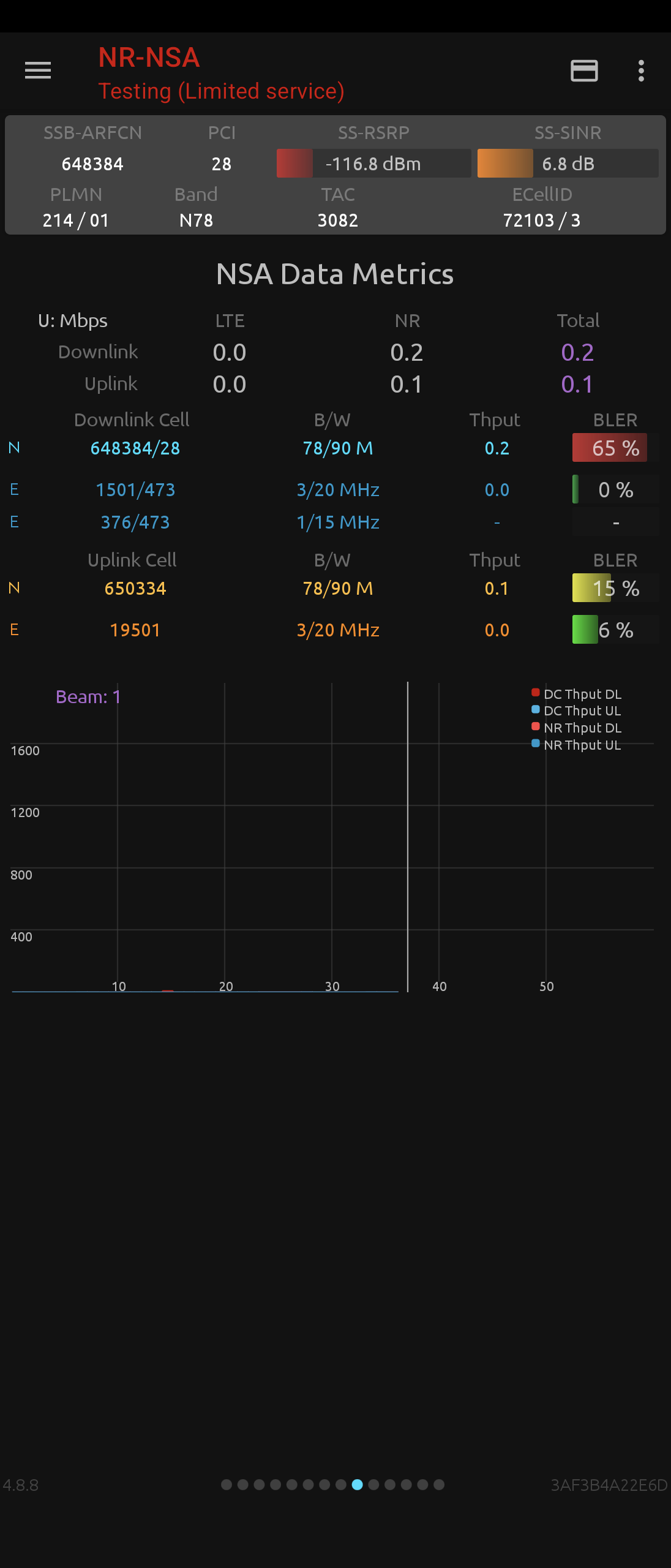
NSG decoding live DIAG traffic on the Xperia 1 V—the rich signaling view that Samsung devices get out of the box.
View full-size image (opens in a new tab)Phase 4 — Granting root to other apps (optional)
The glsu daemon manages access via /data/local/tmp/gl/glsu-uids (storing <uid> <package> pairs), reloaded on every incoming connection. Use the gl-allow helper to update permissions:
$ gl-allow add com.qtrun.QuickTest     # by package name
$ gl-allow add-recent 1                # newest installed app (convenient for randomized package names)
$ gl-allow list
Selected UIDs receive root for the remainder of the session. Revoke entries when finished via gl-allow remove.
Reboot hygiene
- Torn down on reboot: Root access, the
/systemsuoverlay, thediagttybridge, and/devsymlinks. - Preserved across reboots: Compiled binaries, logs, and your allowlist under
/data/local/tmp/gl/.
Restoring the full stack after a restart takes one command: unlock the screen, run ./nsg-root-restore.sh, and launch NSG.
How the bridge works
The core technical challenge wasn’t running the exploit—it was translating between modern modem IPC and legacy diagnostic tooling.
Service discovery. QRTR exposes an AF_QIPCRTR control socket where hardware subsystems register their endpoints. On the Snapdragon 8 Gen 2 (SM8550), the DIAG service registers as service ID 4097 at node 0, port 28. The qrtr_probe tool dumps this registration table directly.
Wire format. DIAG over QRTR carries the classic variable-length command stream, but responses arrive wrapped in a 4-byte framing header (two 16-bit little-endian fields for version and payload length):
0000: 07 00 30 00  ...DIAG payload...
      ^^ver ^^len
Here, version 0x0007 precedes a 0x0030 (48-byte) payload. The diagtty bridge strips this header before passing packets to the PTY, providing the raw byte stream NSG expects. Outgoing commands are forwarded directly, as this modem firmware accepts unframed requests over QRTR.
Why a PTY? NSG expects to open() a serial character device and read() a raw byte stream without packet encapsulation. A pseudo-terminal emulates this interface cleanly. Furthermore, the PTY slave path (/dev/pts/N) is a standard filesystem node that can be symlinked to mirror Samsung’s device layout. The daemon keeps the master end, shuttling data bidirectionally across a thread pair and exposing an abstract UNIX control socket (@diagtty) for status checks and clean teardown.
Why a su shim? NSG manages root access via libsu, which expects a structured, record-delimited protocol over stdin/stdout. The raw kernel-domain shell parked by the exploit suffices for shell scripts, but fails libsu handshakes. glsu implements that protocol alongside UID allowlisting, allowing NSG to detect root access and proceed without hanging.
Post-mortem: the cold-boot crash
The first cold-boot test crashed Android hard: apps died at launch, the framework restarted in an infinite loop, and ps -AZ revealed 171 processes running under the SELinux context unlabeled. Warm re-runs of the exact same code had succeeded every time—the classic hallmark of a boot-time concurrency race.
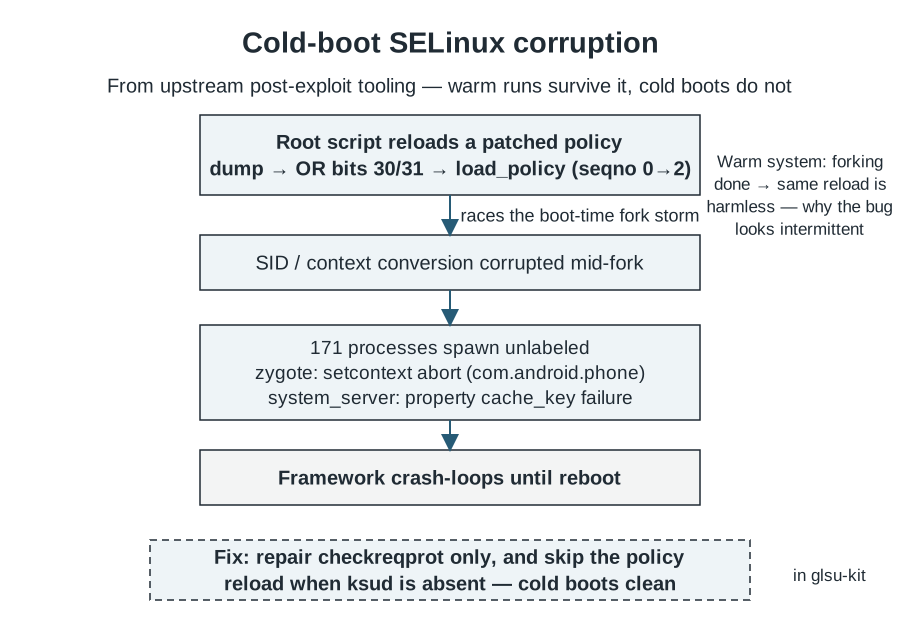
A policy reload racing the boot-time fork storm. The fix: skip the reload entirely when the KernelSU daemon it was meant to enable is absent.
View full-size image (opens in a new tab)The root script (inherited from upstream tooling) dumped /sys/fs/selinux/policy, set two permission bits, and reloaded the policy into the kernel. This was intended to prepare for late-loading KernelSU (ksud), which was not even installed on my device (policyload before=0 after=2, followed by ksud missing).
Reloading SELinux policy while Zygote is actively forking hundreds of system processes triggers a race during Security Identifier (SID) conversion: newly spawned processes receive security contexts the kernel cannot resolve, causing selinux_android_setcontext to abort inside Zygote and system_server to crash when setting system properties. On an already-booted, warm system, that fork storm has long passed, rendering the exact same reload benign. What looked like an intermittent glitch had a completely deterministic cause.
The fix in my build: the script repairs checkreqprot (which the exploit’s memory writes disturb) and exits before touching SELinux policy. Upstream warrants the general fix—gating policy reloads on ksud availability—and I have prepared a patch accordingly.
The takeaway is universal: post-exploit logic must always be validated against the coldest boot state you intend to support. Warm-run stability proves nothing about boot-time race resilience.
Operational nuances
SELinux and Binder IPC. Root processes spawned by the exploit run in the kernel SELinux domain. Even in permissive mode, servicemanager rejects certain Binder lookups from this domain, causing su -c 'pm install ...' to fail with Can't find service: package. Instead, install APKs through standard ADB (adb shell pm install -r file.apk), which requires no root elevation and bypasses interactive Play Protect prompts.
Clean shutdowns. When collecting network logs for analysis, reboot deliberately. Running a raw su -c reboot bypasses init’s orderly shutdown sequence and can discard buffered filesystem writes. Always sync filesystems first: su -c 'sync; reboot'.
Troubleshooting
| Symptom | Cause | Fix |
|---|---|---|
| Script stalls at “waiting for PM” | Device rebooted but screen never unlocked | Unlock the screen once to decrypt storage, then re-run |
| NSG: “root access found, but access denied” | Conflicting or stale glsu instances |
Kill stale daemons (killall glsu), verify empty pidof glsu, and restart |
| PTY held open, but no DIAG traffic | Bridge up, but wrong QRTR service/port | Re-run qrtr_probe; confirm service 4097, node 0, port 28 |
uname -r mismatch abort |
Firmware update changed the kernel build | Re-extract offsets or stay on the matching build |
| Framework bootloops after exploit | Cold-boot SELinux policy reload race | adb reboot; use the fixed restore script |
su -c pm install fails |
Kernel-domain Binder refusal | Install via standard ADB: adb shell pm install -r |
Closing
The real takeaway from this project is the userspace plumbing that connects commodity diagnostics with modern Qualcomm architectures: a PTY translating QRTR packets, a libsu-compatible shim with fine-grained access control, and a restore script that treats a cold boot as a first-class test case. Everything is in glsu-kit under Apache-2.0.
Open items on my list: three unexplained system tombstones from an idle afternoon with the stack live, and a DCI (port 31) data path NSG does not yet consume. Get in touch if you are poking at the same things.